How to export your Revolut transactions as a CSV
Revolut exports a statement as a CSV in a couple of clicks, from the web app or your phone. We cover why the CSV hides behind an option labelled Excel, how multi-currency accounts export, and what lands in Kleev afterwards.

The short version
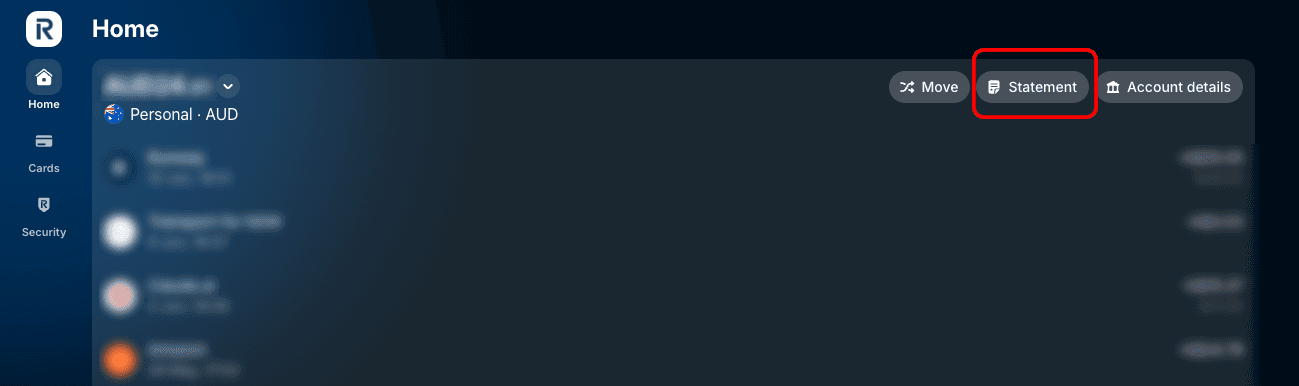
- Open your account in the Revolut web app and click Statement at the top right.
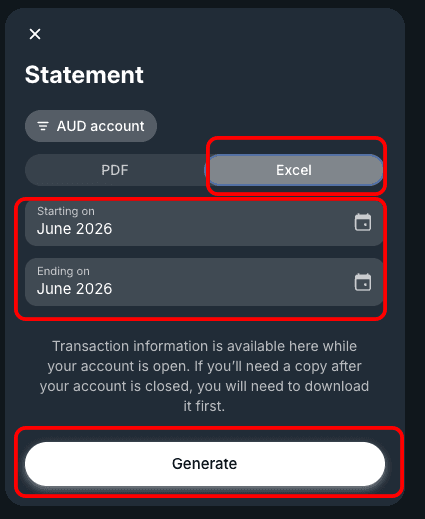
- Choose the Excel format (it downloads as a CSV), set the date range, and click Generate.
- Drop the file into Kleev. Export each currency balance separately if you hold more than one.
This is the Revolut chapter of our full CSV export guide, expanded with the questions the interface raises: why the CSV is labelled Excel, and what to do when you hold several currencies.
How do I export a Revolut statement as a CSV?
Revolut exports a CSV through the Statement button on an account, in both the web app and the phone app. In the web app, open the account from Home and click Statement at the top right.
Choose Excel for the format, pick your date range, then click Generate.
Why does Revolut call the CSV "Excel"?
Revolut labels its data export Excel because that's what most people open it with, but the file it hands you is a CSV. So don't go looking for a separate CSV entry in the dialog: Excel is the machine-readable option and PDF is the human-readable one. If you want something Kleev, a spreadsheet or an accountant's software can read, pick Excel.
Can I export from the Revolut app on my phone?
Yes, and this is one of the few accounts where the app is a genuine alternative to the web. Open the account, find Statement, choose the Excel format and set your dates. The file is the same one the web app generates, which is handy if you're sorting out your finances on a train rather than at a desk.
How do I export several currencies?
Revolut generates a statement per account, so if you hold AUD, GBP and EUR balances you take three exports rather than one combined file. Upload them to Kleev together and they arrive as separate accounts in the same combined view, which is what you want: mixing currencies into one column would make every total meaningless. If you moved money between your own balances, those show up as transfers rather than spending.
How far back can I export?
Revolut's date range goes back to when you opened the account, so unlike a bank with a rolling search window, one export can usually cover your whole history. Set the start date to the day you joined and take the lot in a single file.
What happens once the CSV is in Kleev?
Drop the file in and Kleev recognises the Revolut format from its columns, normalises the rows and starts categorising so your spending view fills in. Because Revolut sits alongside a main bank account for most people rather than replacing it, the useful move is exporting both and uploading them together, so your spending totals cover everything instead of the half you happened to remember. Parsing happens in your browser and the file is never uploaded; Kleev's AI features do send transaction details to Anthropic's Claude API for categorisation. There's no Revolut login involved at any point.
Common questions
Where is the CSV option in Revolut?
Revolut's statement dialog offers Excel and PDF, and the Excel option is the one that downloads as a CSV. Choose Excel rather than PDF, set your dates, and generate; the file you get back is the data file Kleev reads.
Can I export a Revolut statement from the phone app?
Yes. Revolut is one of the few accounts where the mobile app exports properly: open the account, find Statement, choose the Excel format and your date range, and the app generates the same file the web app does.
How do I export more than one Revolut currency?
Revolut generates a statement per account, so if you hold several currency balances you export each one separately and upload the files together. Kleev reads them as separate accounts in the same combined view.
How far back can I export from Revolut?
Revolut lets you pick a custom date range back to when you opened the account, so a single export can usually cover your entire history rather than a rolling window. Set the start date to your join date if you want the lot.
Does Kleev need my Revolut login?
No. Kleev never asks for your Revolut credentials or connects through a data aggregator. You generate the statement in Revolut yourself and drop the file into Kleev, where it's parsed on your device.