How to export your HSBC transactions as a CSV
HSBC's online banking exports recent transactions as a CSV, but only a short window of them. We cover the download dialog and its oddly named CSV option, the 90-day limit, and how to turn older e-statement PDFs into a file you can actually use.
The short version
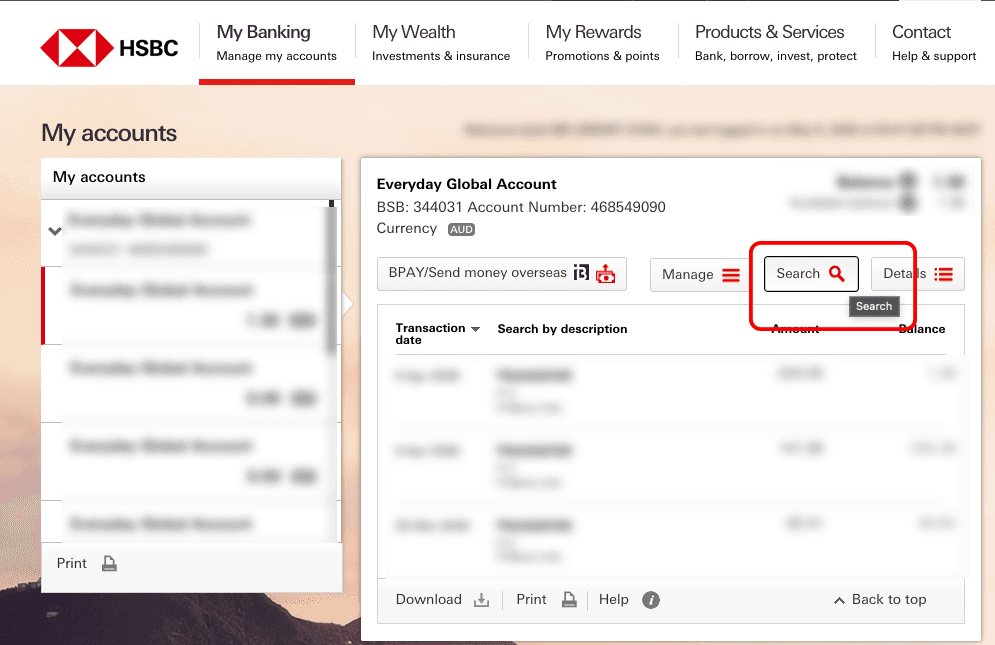
- Log into HSBC online banking in a browser, open My accounts, choose the account and click Search.
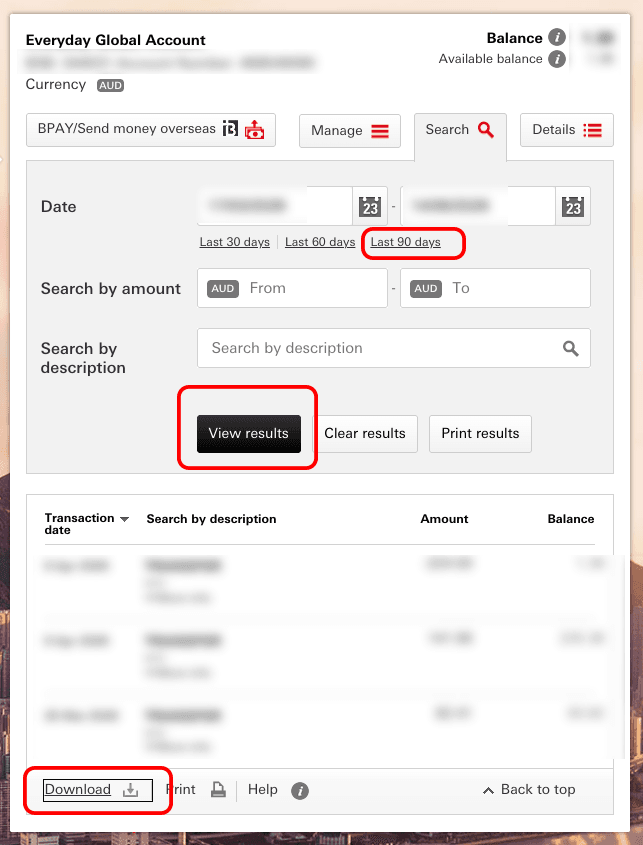
- Set the date range (online export reaches back roughly 90 days), click View results, then Download.
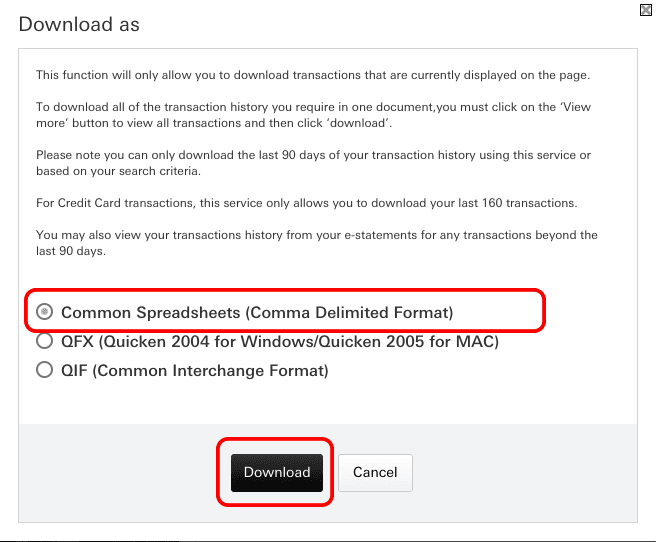
- In Download as, choose Common Spreadsheets (Comma Delimited Format), which is the CSV, and download.
This is the HSBC chapter of our full CSV export guide, with more room for the two things HSBC users always ask: what that long download-format name means, and how to deal with the 90-day wall.
How do I export my HSBC transactions as a CSV?
HSBC exports transactions as a CSV from online banking, through the Download button that appears after you search an account's transactions. Start by opening the account and clicking Search.
Set the date range, click View results, then click Download beneath the results.
What does "Common Spreadsheets (Comma Delimited Format)" mean?
That's HSBC's name for a CSV. "Comma delimited" is literally what CSV stands for, so the option you want is the one that sounds least like it. The other entries in the dialog target specific desktop programs (Quicken, MS Money), and you don't need those. Choose Common Spreadsheets and click Download.
How far back can I export from HSBC online banking?
HSBC's online transaction search covers roughly the last 90 days, so that's the ceiling on the CSV export too. It's the shortest window of any bank in our export guide, and it catches people out when they sit down in July to sort out a whole financial year. If you're planning to track your spending properly, the practical habit is to export every few months rather than once a year.
How do I get HSBC transactions older than 90 days?
Older periods come from HSBC's e-statements, which are PDFs rather than data files. You can convert them yourself: download the statement PDFs, hand them to an AI assistant with a prompt asking for date, description, amount and balance columns, and upload the CSV it produces. The exact prompt, with buttons to open it in Claude, ChatGPT or Gemini, is in the parent CSV export guide. Check the converted rows against the PDF before you rely on them; an AI can misread a smudged column, and it's your money.
Can I export from the HSBC app?
The HSBC app is built for viewing balances and making payments, so the download controls sit in online banking on the web. Use a browser, and if you're on a phone, request the desktop site so the Download link appears.
What happens once the CSV is in Kleev?
Drop the file in and Kleev works out which columns hold the date, description and amount, normalises the rows and starts categorising them so your spending view fills in. It also works out from the file itself whether debits are written as negatives or positives, because banks disagree about that and the answer is a property of the file rather than the bank. The CSV is parsed in your browser and never uploaded, though Kleev's AI features do send transaction details to Anthropic's Claude API for categorisation. Your HSBC login stays entirely out of it.
Common questions
Which HSBC download option is the CSV?
HSBC labels its CSV as "Common Spreadsheets (Comma Delimited Format)" in the Download as dialog, which is the same thing under a longer name. Pick that one; the Quicken and MS Money options are for those specific desktop programs.
Why can't I export more than 90 days from HSBC?
HSBC's online transaction search covers roughly the last 90 days, and the export can only include what the search returns. Older periods live in e-statements instead, which HSBC keeps as PDFs for considerably longer.
How do I get HSBC transactions older than 90 days into Kleev?
Download the e-statement PDFs for those months, then have an AI assistant convert them into a CSV with date, description, amount and balance columns, and upload that CSV. The conversion prompt is in our full CSV export guide.
Does Kleev need my HSBC online banking login?
No. Kleev never asks for your HSBC username, password or security device codes, and it doesn't connect through a data aggregator. You download the file from HSBC yourself and drop it into Kleev, where it's parsed on your device.
Can I export a CSV from the HSBC mobile app?
The HSBC app is oriented around viewing and payments, so the download controls are in online banking on the web. Use a browser for the export, and request the desktop site if you're doing it from a phone.