How to find and cancel unused subscriptions in Australia
Forgotten subscriptions hide in plain sight on your bank statements: the January gym, the trial that quietly converted, the streaming service nobody watched since the show ended. We show you how to find every recurring charge you're paying, and the fastest honest route to cancelling the ones you don't want.
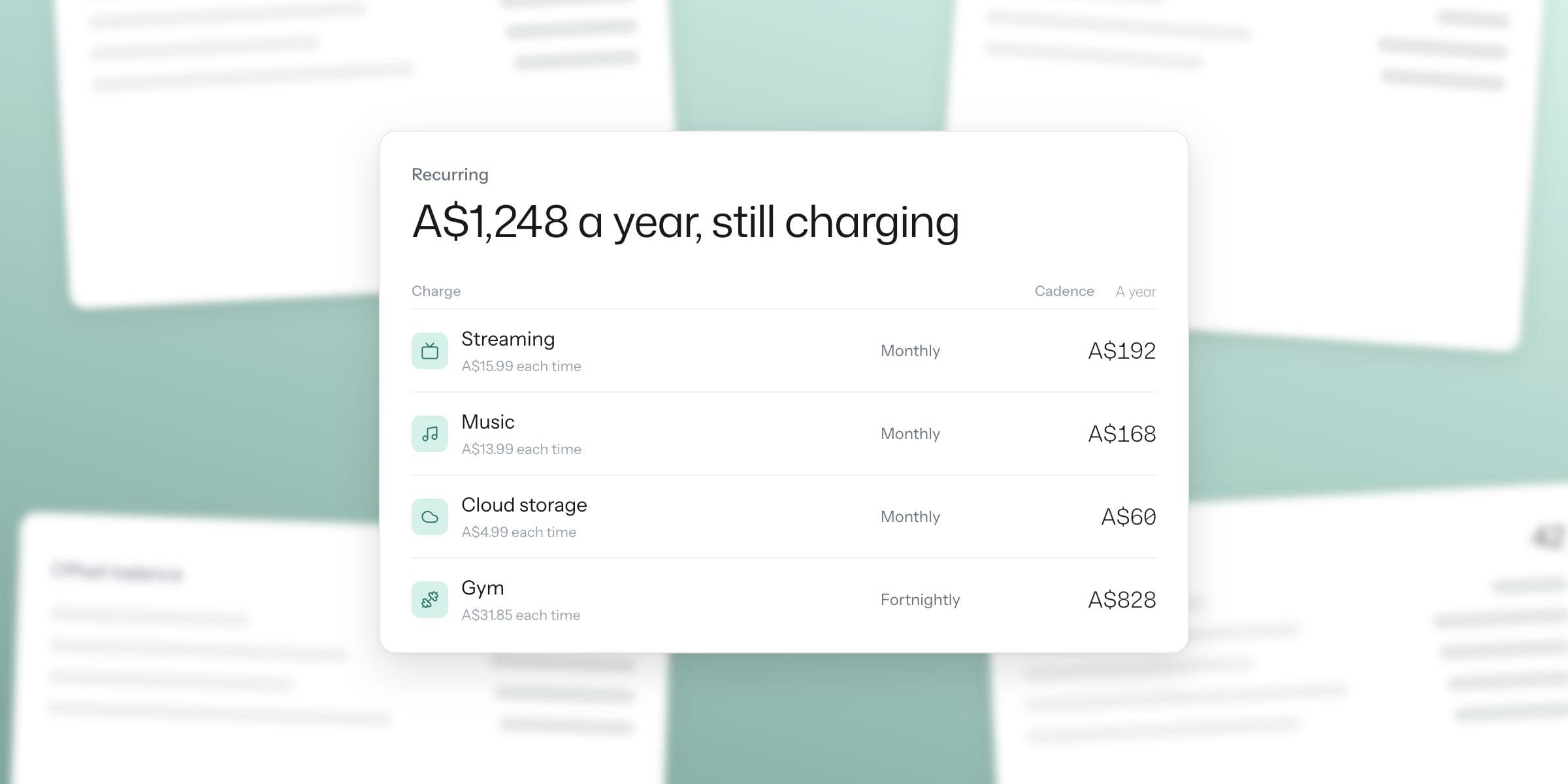
The short version
- Read three months of statements across every card and account, and flag anything that repeats. That window catches the quarterlies as well as the monthlies.
- Cancel with the provider, except when a middleman does the billing. App-store subscriptions cancel in your Apple or Google settings, not on the provider's site.
- Kleev finds your recurring charges automatically and links you to each provider's own cancel page. It never cancels on your behalf, so that final click is always yours.
Subscriptions are built to be easy to start and easy to forget. The free trial that needed a card number, the app that moved to a yearly plan, the streaming service you added for one show two winters ago.
Each one is small enough to slide under your attention, and together they leak money out of almost every budget we see. The fix is visibility, followed by ten minutes of admin.
How do I find subscriptions I've forgotten about?
Read your own bank and card statements looking for repetition: the same merchant, at a regular interval, for the same or similar amount.
Go back at least three months so quarterly charges surface, and check every account and card, because subscriptions scatter across whichever card you happened to use on sign-up day.
Watch for the disguises too. Billing names often don't match the brand, and charges routed through app stores show up as Apple or Google rather than the service you actually use.
Can a tool do this for me?
Kleev automates the tedious part. Upload your statements as CSVs and it groups merchants by cadence and amount consistency, then lists every recurring charge it detects across all your accounts at once.
That covers the monthlies, the quarterlies, and the annual renewals that no one remembers agreeing to. Kleev also flags when a recurring charge's price has crept up, and when a brand-new charge looks like a free trial that just converted.

Which charges hide best?
- Annual renewals. Domain names, cloud storage, software licences and memberships bill once a year, so any monthly scan of your statement misses them. Check a longer window, or use a tool that has seen your whole year.
- Trial conversions. The free month quietly becomes a paid one. You miss the first real charge because you had filed the service away as free.
- Price creep. A subscription rarely costs now what it cost when you signed up. Small rises land silently, and over a few services they compound into real money.
- Doubles across a household. Two people, two music subscriptions, one shared speaker. If you split costs with a partner, do the audit together; our guide to managing money as a couple covers the shared-spending side.
- Services you stopped using. The charge still works, you just haven't opened the app since the show ended, the diet changed, or the hobby passed.
How do I cancel common Australian services?
Sign in on the provider's website, open account or subscription settings, and use the cancel or manage-plan option there. The major streaming services available in Australia, including Netflix, Stan, Binge, Kayo and Disney+, all support self-service cancellation this way.
The important exception is anything you subscribed to inside an iOS or Android app. Apple or Google bills those, so you cancel them in your App Store or Google Play subscription settings rather than with the provider.
Open those store subscription lists during your audit anyway. They are themselves a tidy register of recurring charges you may have forgotten.
Which services make cancelling hard?
Gyms commonly require notice, sometimes in writing, and the terms live in your membership agreement, so check yours before assuming a website button exists.
Telco and insurance changes usually run through a call or chat. With insurance in particular, be certain about replacement cover before you cancel anything.
If a provider makes leaving genuinely difficult, put your request in writing and keep a copy. A paper trail concentrates minds.
Does Kleev cancel subscriptions for me?
No, and we'd rather tell you that plainly than imply otherwise. Kleev finds the charges and gets you to the right cancellation page quickly.
It detects your recurring charges, shows what each one costs you per year, flags price rises and likely trial conversions, and gives you a direct link to the provider's own cancellation page, or their account portal when no self-service cancel exists.
The final step always happens between you and the provider, on their site, under your login. Kleev never holds your accounts and never acts on them.
What does the whole audit look like?
Export your statements, drop the CSVs into Kleev, open the recurring view, and go down the list with an honest eye.
Keep what you use, and follow the cancel link for what you don't. Most people finish the first pass inside half an hour, and the spending view shows the recurring total shrinking from the next month's upload. Find your recurring charges in Kleev →
Common questions
How do I find all my subscriptions?
Go through two to three months of statements for every account and card, and flag any merchant that appears at a regular interval for a similar amount. Three months matters because it catches quarterly charges. Kleev automates exactly this: it reads your uploaded transactions, groups merchants by cadence and amount, and lists every recurring charge it finds, including annual ones your monthly scan would miss.
How do I cancel a streaming service in Australia?
Sign into your account on the provider's website, open the account or subscription settings, and look for a cancel or manage-plan option. Netflix, Stan, Binge, Kayo, Disney+ and the other major services in Australia all offer self-service cancellation from account settings. If you subscribed through the App Store or Google Play, you must cancel there instead, in your store subscription settings.
Why is my subscription not cancellable on the provider's website?
Usually because the billing runs through an intermediary. Subscriptions started inside iOS or Android apps are billed by Apple or Google and cancel in your App Store or Google Play subscription settings. Some services, like certain gyms and telcos, require you to cancel by phone, chat or in writing instead of self-service.
Does Kleev cancel subscriptions for me?
No, and we're upfront about that. Kleev finds your recurring charges, flags price rises and likely trial conversions, and takes you to the provider's own cancellation page or account portal. The cancellation itself always happens between you and the provider. Kleev never acts on your accounts.
How much can I save by cancelling unused subscriptions?
It depends entirely on what you're paying for, which is the point of doing the audit: most people can't answer until they see the list. Add up the recurring charges you find, multiply the monthly ones by twelve, and the annual figure for services you've stopped using is your answer.